# Shared Excel File

**Hướng dẫn kết nối Shared Excel File**

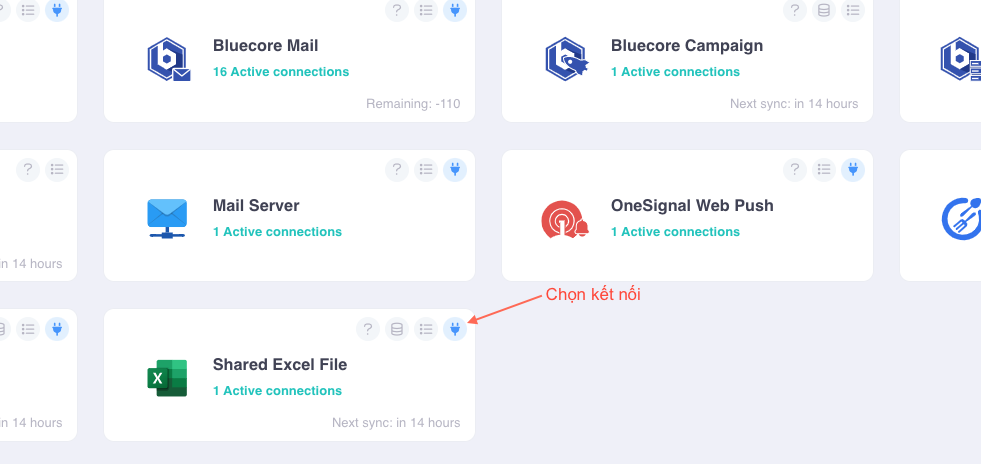
Bước 1: Chọn biểu tượng ***“Add Connection”*** bên phải logo Shared Excel File để kết nối dữ liệu cửa hàng trong phần mềm Nhanh với Bluecore.

<div><img src="https://help.bluecore.vn/assets/imgs/img-connector/img-shared-excel-file/share-ex-file-1.png" alt=""> <figure><img src="https://content.gitbook.com/content/QAQ4hFJypvowstD5XZfm/blobs/WjWhijrdOeLRViC7mtZ8/share-ex-file-1.png" alt=""><figcaption></figcaption></figure></div>

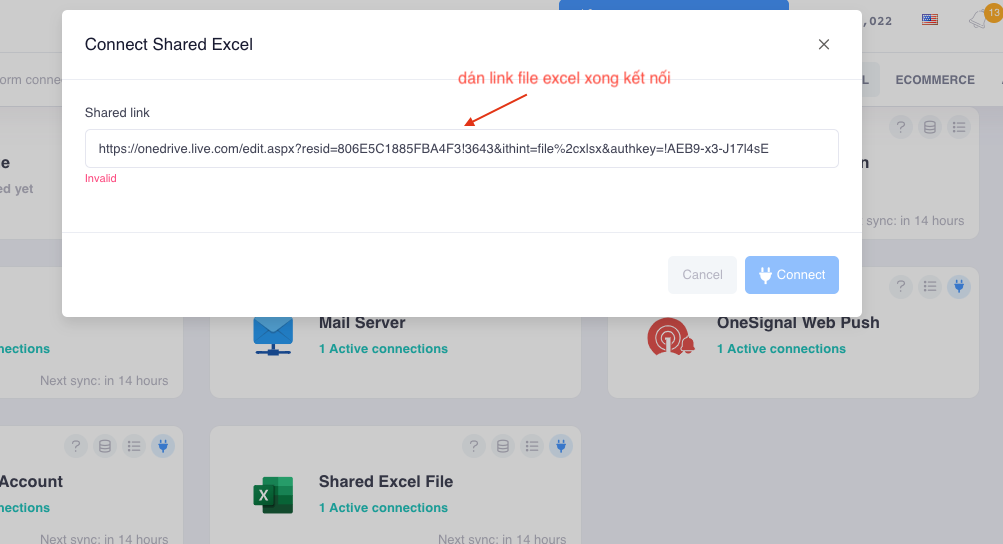
Bước 2: Xuất hiện cổng modal để gán link Shared Excel File và kết nối.

<div><img src="https://help.bluecore.vn/assets/imgs/img-connector/img-shared-excel-file/share-ex-file-2.png" alt=""> <figure><img src="https://content.gitbook.com/content/QAQ4hFJypvowstD5XZfm/blobs/P5Oik31IInLE4ZTkBQS8/share-ex-file-2.png" alt=""><figcaption></figcaption></figure></div>

**Những dữ liệu sẽ được chia sẻ với Bluecore:**

* Dữ liệu về sản phẩm: danh sách sản phẩm, chi tiết sản phẩm, quà tặng sản phẩm, danh mục sản phẩm…
* Dữ liệu về đơn hàng: danh sách đơn hàng, cập nhật đơn hàng, danh sách lịch sử đơn hàng, khiếu nại đơn hàng…
* Dữ liệu về hóa đơn: danh sách phiếu xuất nhập kho, danh sách sản phẩm xuất nhập kho nháp, danh sách sản phẩm xuất nhập kho…
* Dữ liệu về khách hàng: danh sách khách hàng…
* Dữ liệu về nhà cung cấp: danh sách nhà cung cấp…
* Dữ liệu về khuyến mãi: danh sách coupon…

Bước 4: Kết nối thành công vào Bluecore. Đợi một vài phút để tải dữ liệu từ hệ thống cửa hàng MicroSoft Account của bạn đổ về Bluecore.

**Lưu ý:**

* Dữ liệu sẽ được cập nhật vào lúc 0h mỗi ngày.
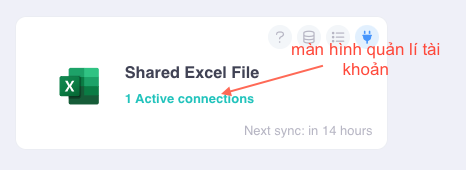
* n Active connections: n là số tài khoản được kết nối với Bluecore.

**Sau khi kết nối thành công, màn hình kết nối sẽ hiển thị các kết nối đang được hoạt động**

<div align="left"><img src="https://help.bluecore.vn/assets/imgs/img-connector/img-shared-excel-file/share-ex-file-3.png" alt=""> <figure><img src="https://content.gitbook.com/content/QAQ4hFJypvowstD5XZfm/blobs/YMNmNvuCl3yqnQmfDhqt/share-ex-file-3.png" alt=""><figcaption></figcaption></figure></div>

**Click vào tài khoản kết nối**
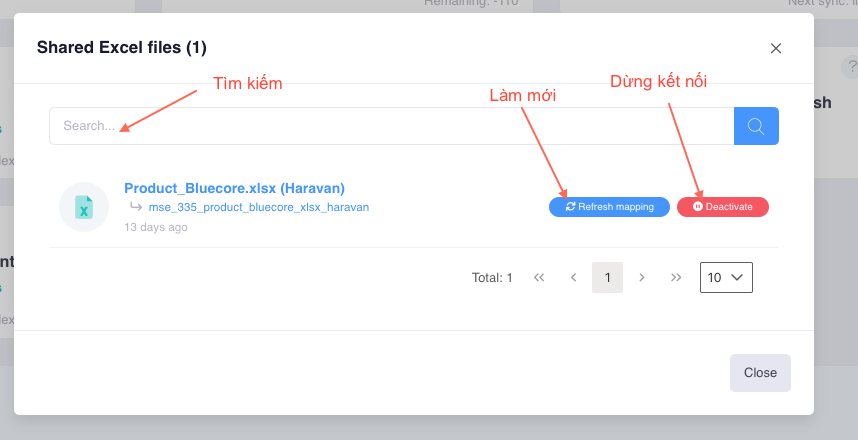
<div><img src="https://help.bluecore.vn/assets/imgs/img-connector/img-shared-excel-file/share-ex-file-4.png" alt=""> <figure><img src="https://content.gitbook.com/content/QAQ4hFJypvowstD5XZfm/blobs/OlGBmO0adwntYEglZMKJ/share-ex-file-4.png" alt=""><figcaption></figcaption></figure></div>


---

# Agent Instructions: Querying This Documentation

If you need additional information that is not directly available in this page, you can query the documentation dynamically by asking a question.

Perform an HTTP GET request on the current page URL with the `ask` query parameter:

```
GET https://help.bluecore.vn/english/connectors/datastorage/sharedexcelfile.md?ask=<question>
```

The question should be specific, self-contained, and written in natural language.
The response will contain a direct answer to the question and relevant excerpts and sources from the documentation.

Use this mechanism when the answer is not explicitly present in the current page, you need clarification or additional context, or you want to retrieve related documentation sections.