# Google Analytics 4 (Report)

<div align="left"><figure><img src="https://content.gitbook.com/content/QAQ4hFJypvowstD5XZfm/blobs/dS9bKPWUmLFwoAbuoDNU/image15.gif" alt=""><figcaption></figcaption></figure></div>

Chuyển dữ liệu Report từ Google Analytics 4 đến Data Warehouse (BigQuery). Dữ liệu sẽ được cập nhật vào lúc 0h mỗi ngày.

**Những dữ liệu sẽ được chia sẻ với Bluecore:**

* Dữ liệu về người dùng đến từ các nguồn website
* Dữ liệu về số người truy cập trang, thời gian ở lại
* Dữ liệu về insight

#### Cho phép Bluecore đọc dữ liệu báo cáo GA4 <a href="#cho-phep-bluecore-doc-du-lieu-bao-cao-ga4" id="cho-phep-bluecore-doc-du-lieu-bao-cao-ga4"></a>

* [Đăng nhập vào tài khoản Google Analytics của bạn](https://analytics.google.com/analytics/web/provision/)
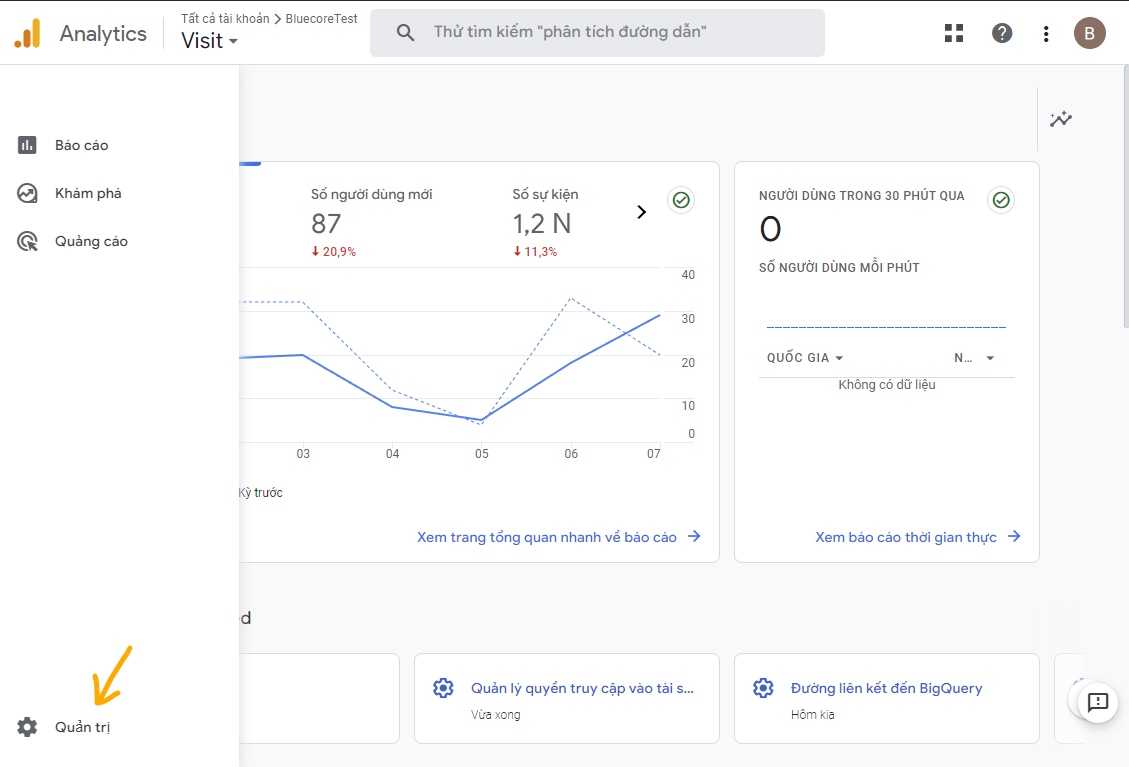
  * Vào menu “Quản trị”

<figure><img src="https://content.gitbook.com/content/QAQ4hFJypvowstD5XZfm/blobs/RkEGZfBWYCuKe2YeNH2W/ga4-report-step1.png" alt=""><figcaption></figcaption></figure>

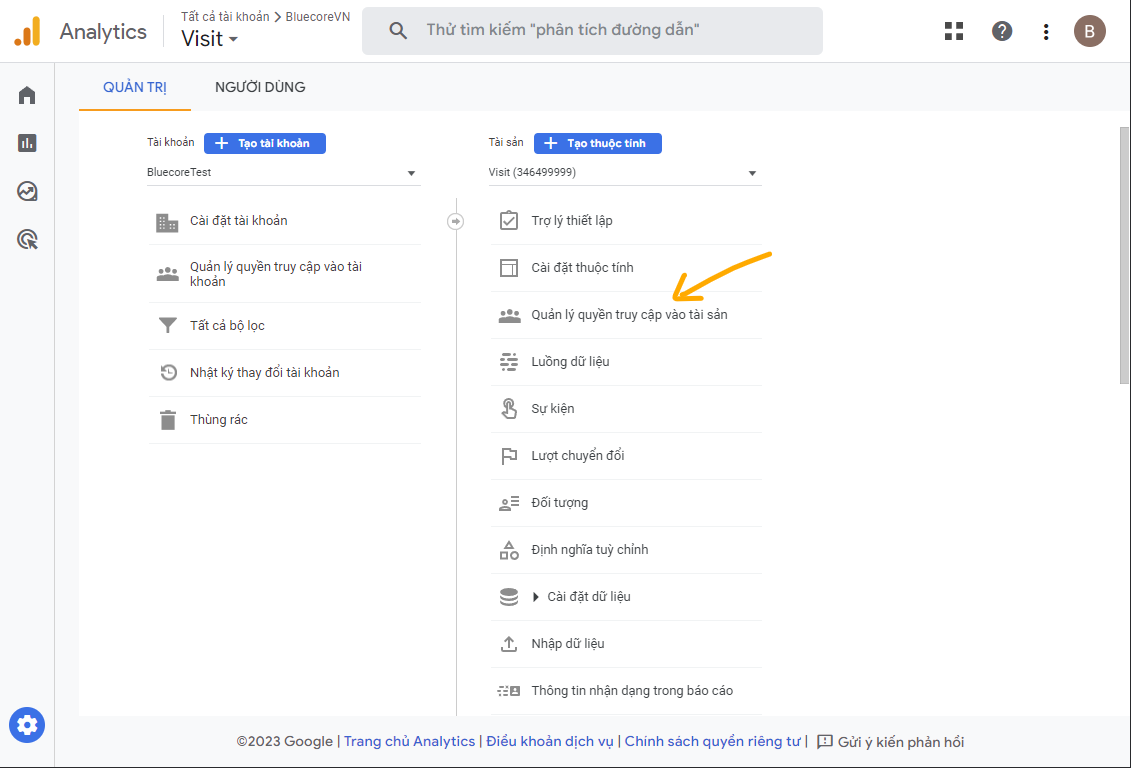
* Vào mục “Quản lý quyền truy cập vào tài sản”

<figure><img src="https://content.gitbook.com/content/QAQ4hFJypvowstD5XZfm/blobs/gdUicy8yVy0iBXjD9VMA/ga4-report-step2.png" alt=""><figcaption></figcaption></figure>

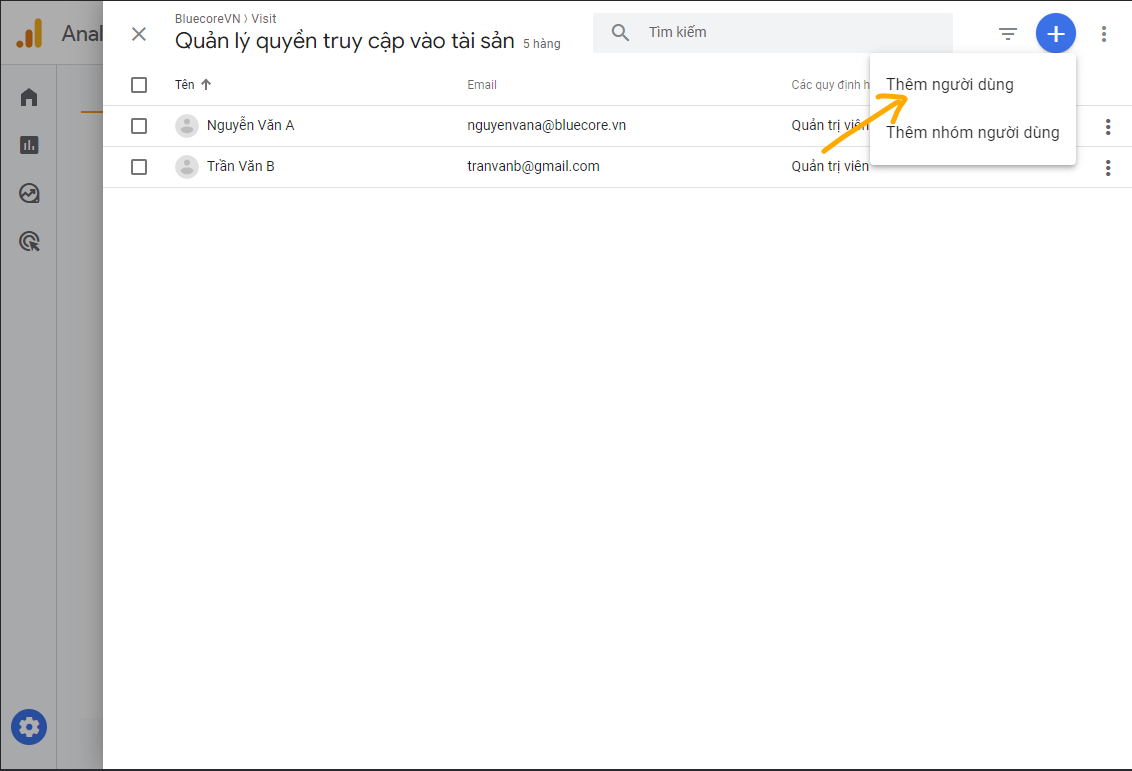
* Chọn “Thêm người dùng mới”

<div align="left" data-full-width="false"><img src="https://content.gitbook.com/content/QAQ4hFJypvowstD5XZfm/blobs/E2hA3yCxyozResSpqR9K/image.png" alt=""></div>

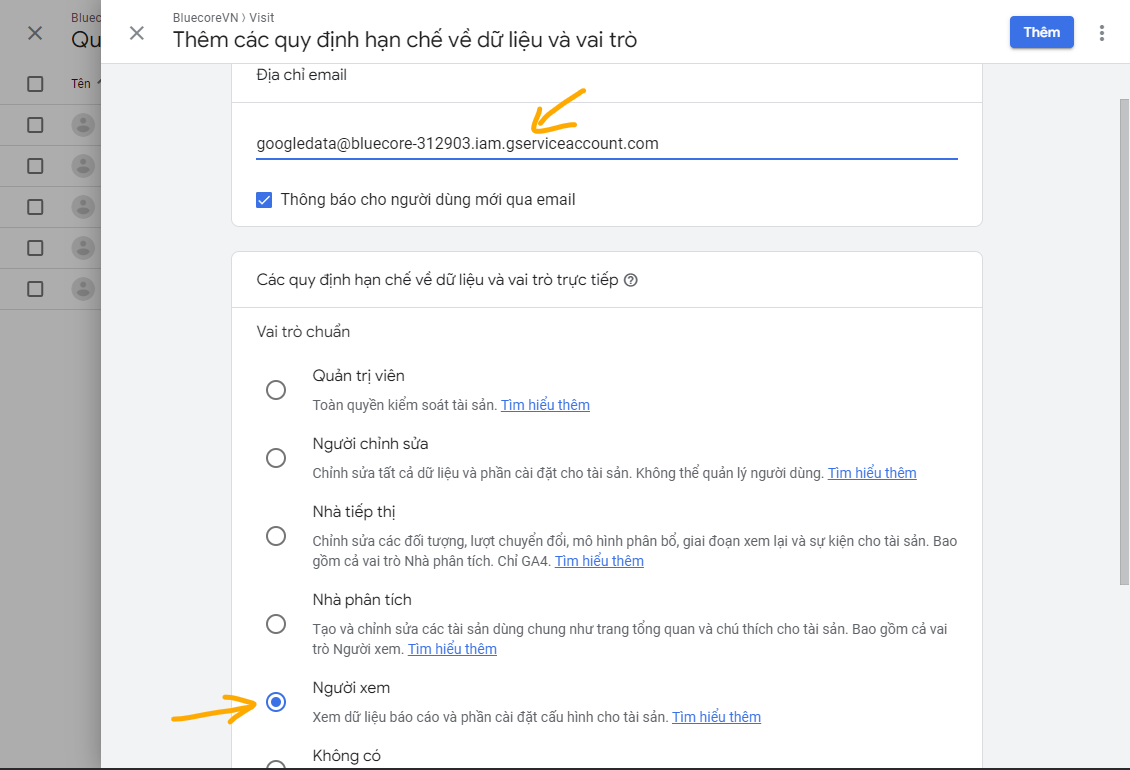
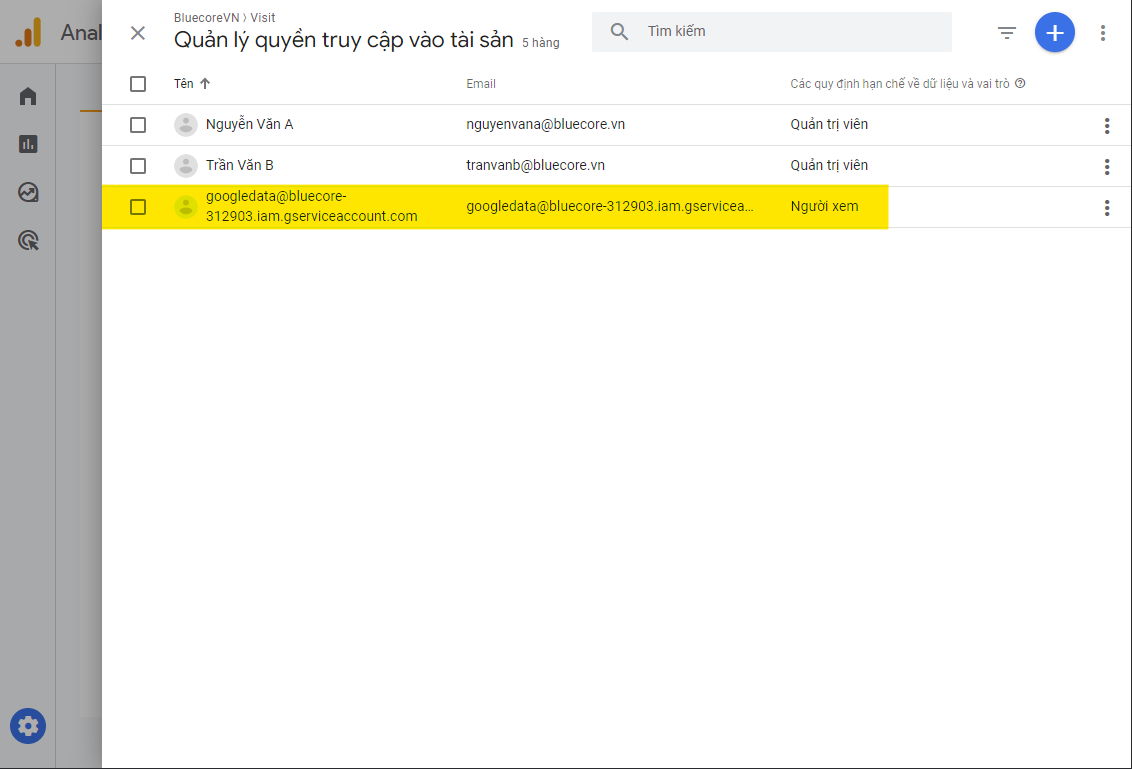
* Thêm tài khoản của Bluecore với quyền “Xem”: <mark style="color:yellow;">`googledata@bluecore-312903.iam.gserviceaccount.com`</mark>

<div align="left"><img src="https://help.bluecore.vn/assets/imgs/img-connector/ga4-report/ga4-report-step4.png" alt=""> <figure><img src="https://content.gitbook.com/content/QAQ4hFJypvowstD5XZfm/blobs/tKcX9M0IwbsP0rZ5rN2u/ga4-report-step4.png" alt=""><figcaption></figcaption></figure></div>

<div align="left"><img src="https://help.bluecore.vn/assets/imgs/img-connector/ga4-report/ga4-report-step5.png" alt=""> <figure><img src="https://content.gitbook.com/content/QAQ4hFJypvowstD5XZfm/blobs/DLQIIL71dmDDfhk1RA8J/ga4-report-step5.png" alt=""><figcaption></figcaption></figure></div>

#### Tạo kết nối đến GA4 Report

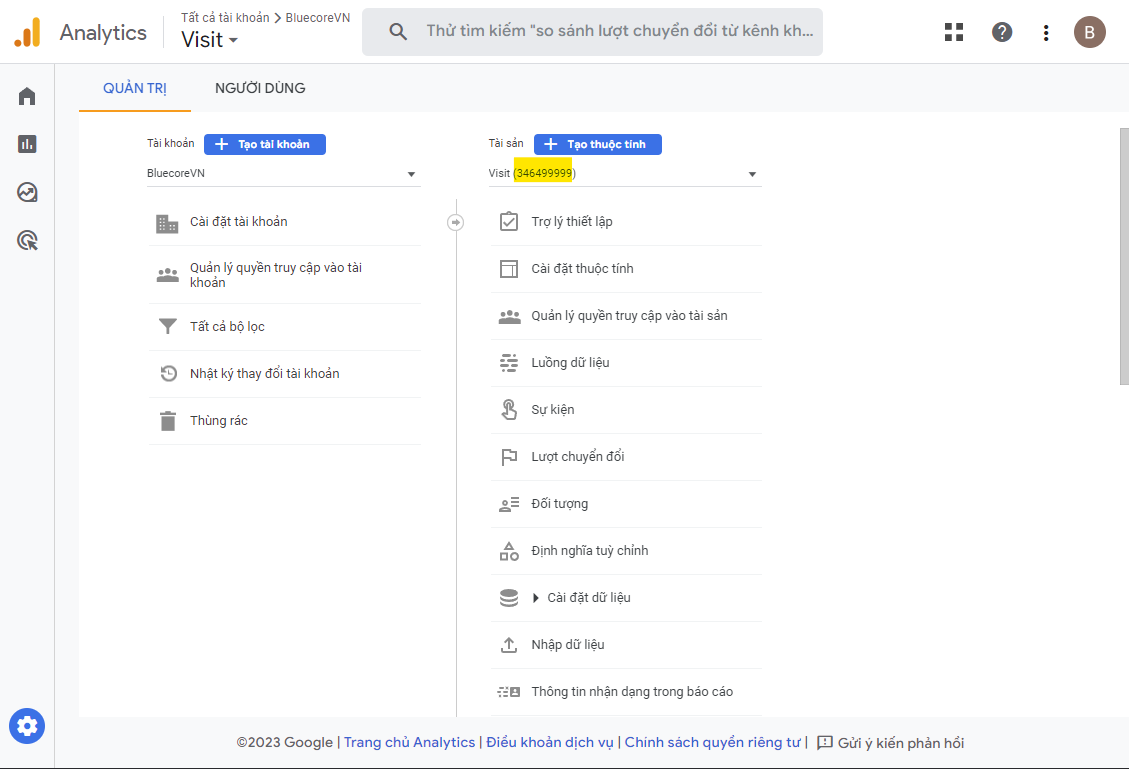
* Trở lại màn hình “Trang chủ”, tại đây bạn có thể xem các `PropertyId` (mã thuộc tính) hiện có, sao chép `PropertyId` cần liên kết với Bluecore

<div><img src="https://help.bluecore.vn/assets/imgs/img-connector/ga4-report/ga4-report-step6.png" alt=""> <figure><img src="https://content.gitbook.com/content/QAQ4hFJypvowstD5XZfm/blobs/q0BTc7z35aYoDFXT5Lcz/ga4-report-step6.png" alt=""><figcaption></figcaption></figure></div>

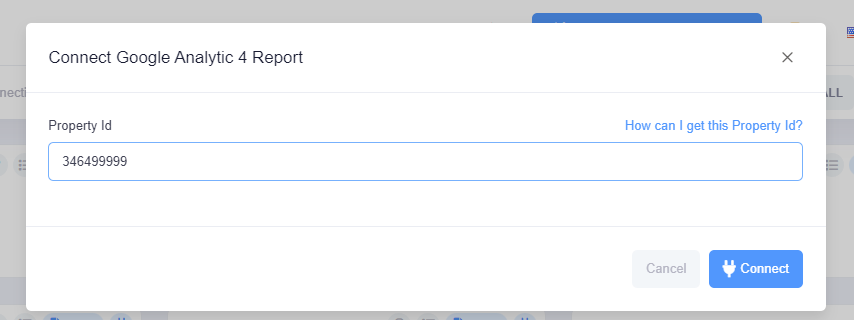
* Điền mã `PropertyId` đã lấy vào màn hình tạo kết nối `Google Analytic 4 (Report)`
<div><img src="https://help.bluecore.vn/assets/imgs/img-connector/ga4-report/ga4-report-step7.png" alt=""> <figure><img src="https://content.gitbook.com/content/QAQ4hFJypvowstD5XZfm/blobs/Ixwudl8BW8h5089aZjKV/ga4-report-step7.png" alt=""><figcaption></figcaption></figure></div>

<br>